Excel and paper
The job sheet filled in by hand in the van, typed up again at the office. You find the mistake when the customer queries the invoice.

Weeks go by between the job being done and the invoice going out, and nobody can say how many. You schedule on a GANTT, technicians report from the app even where there's no signal, and a customer's jobs become a single report — with cost, price and margin already worked out.
A demo on your workflow, not on made-up data. No commitment.
Request → GANTT → Technician's app → Confirmed report → Customer report + margin
Packaging · Food-tech · Glass · Surface treatments










Your real competitor isn't another piece of software. It's the way it's done today.
The job sheet filled in by hand in the van, typed up again at the office. You find the mistake when the customer queries the invoice.
Requests come in on three different channels. The history of that machine lives in one person's head.
Who's going where? One technician is idle, another drives 400 km. Urgent jobs get sorted on the phone, one call at a time.
At month end you know what you invoiced. Not what you made on that job, that customer, that machine.
On its own, none of these looks like a problem. It's when they add up that the margin disappears.
Four steps, one set of data. Entered once, in the field, by the person who was there.
Open the job straight from the customer's request. Machine, serial number and history are already attached.
Machine history in one clickAssign technicians and dates on the GANTT, with availability, holidays and workload in front of you.
Reschedule by draggingThe technician opens the job on the phone and logs hours, kilometres, parts and photos. Even in an underground plant room.
Works with no signalThe job report goes out as a PDF. Then the back office groups the lines from several jobs into a single report, which the customer signs off.
One report, four jobsWhoever schedules, whoever works on site and whoever invoices all look at the same data. Nobody rewrites it.
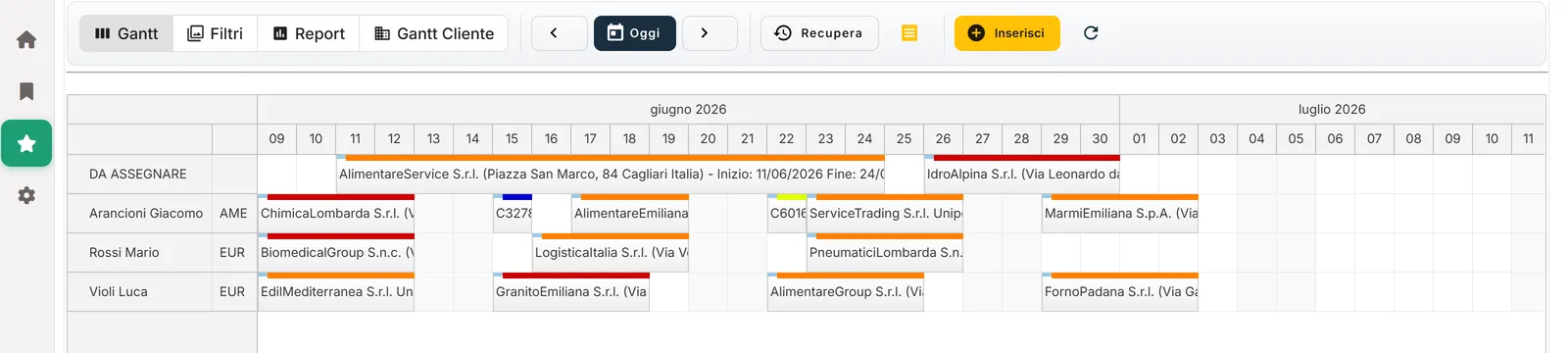
Drag the jobs onto the board and assign the technicians. When the emergency comes in at nine, you move one card and the technician sees it on the phone. The whiteboard and the sticky notes can go.
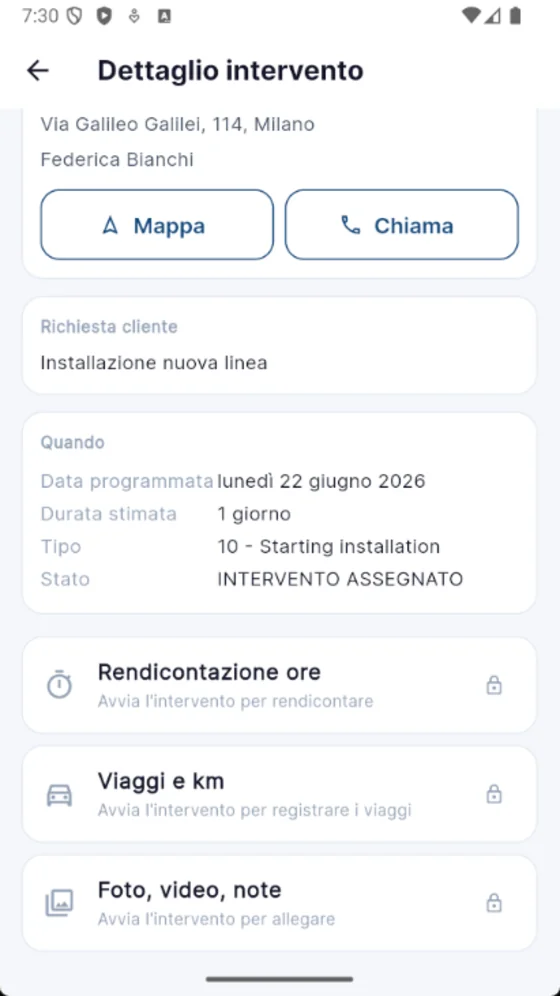
He opens the job, starts the timer, works through the checklist, takes the photos, logs hours and parts. If a part is needed, the note goes straight to the parts desk. When the signal comes back, it syncs on its own.
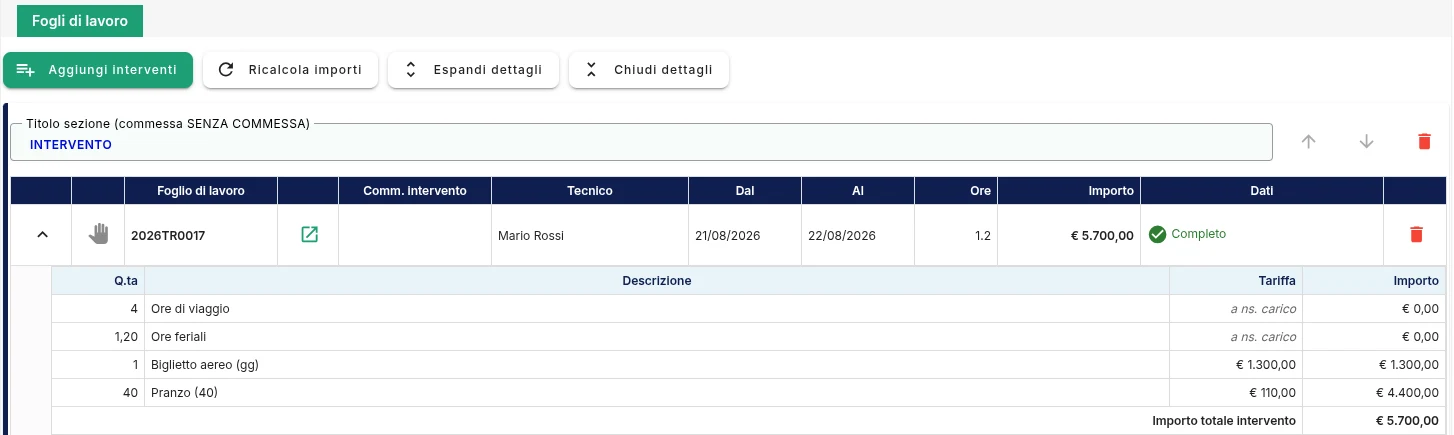
Hours, kilometres, allowances and parts arrive from the field already totalled. The back office has its own area, separate from the operational one: you put together the lines from three or four jobs for the same customer, apply the price list and generate the report to send them for sign-off.
Every hour, every kilometre, every spare part has a cost and a price. NectaPlanner keeps the two apart and ties them to the job, the customer and the individual machine. The report you send carries them along: you don't estimate margin at year end, you read it before you invoice.
Standard, overtime and holiday hours, kilometres, allowances and parts. Cost against price, line by line. And when you choose not to charge a line, it stays on the document marked “at our expense”: the customer sees the gesture, you still see the cost.
That customer who always calls: are they earning you money, or eating the margin from everyone else? The period report tells you before you raise the invoice.
Full history by serial number: what that machine has cost you since it left, warranty included.
| Job | Cost | Price |
|---|---|---|
| #4821 Press maintenance 3h · 48 km · 1 ricambio | € 186,40 | € 300,60 |
| #4830 Filter replacement 2h · 48 km | € 112,00 | € 178,00 |
| #4844 Check and commissioning 6h · 2 tecnici | € 240,00 | € 395,00 |
| Total | € 538,40 | € 873,60 |
| Margin | € 335,20 38,4% |
The customer signs the report off, then you hand it to invoicing. All at once or in stages: you pick the lines.
Under every line there's a detail you can ask us to open up in the demo.
Drag the job, pick the technician. Clashes and gaps show up straight away.
Views by technician, customer, agent or site. Holidays, availability and workload on the same grid.
Who's free, who's on holiday, who's already loaded. Two- and three-hander jobs included.
Each technician starts and closes their own part of the same job.
Multi-site customers, contacts, agents, quotes and leads collected at trade fairs: the CRM is built in.
Per-customer price lists, block on customers in arrears, request for payment up front.
Every serial number knows what has happened to it, and when its warranty runs out.
Jobs, commissioning tests, photos, technical documents and geolocation, per serial number.
Hours and travel logged while the technician works, not from memory the next evening.
Standard, overtime and holiday hours. Chargeable and non-chargeable kilometres. Travel allowances. Expenses. Any line can be absorbed by you: it appears on the document with no amount, but the cost stays in the margin.
Built for the technician. It isn't the desktop system shrunk onto a six-inch screen.
Native app on Google Play and the App Store. Data held on the device and idempotent sync: if the same report is sent twice, nothing is duplicated.
The job report goes out as a PDF, with your branding, in the customer's language.
Italian, English, French or German. The system records when the customer opens it, downloads it and confirms it.
You decide the statuses and the approvals. The software fits your process, not the other way round.
From first pick-up to invoiced, with the checks where you want them.
A separate area for the back office: group the lines from several jobs for the same customer and prepare the document for them to sign off.
Invoice four jobs in one go, or in stages over time. Cost and price kept apart on every line, so the report's margin falls out on its own. Contracts, service orders, spare parts and per-customer price lists.
If your technicians spend more time on site than at a desk, we speak the same language.
Plenty of machines across plenty of sites, and the history of the one that just stopped is nowhere to be found.
Full history by serial number, and planned maintenance already on the GANTT.
The job sheet turns up a week later, and meanwhile the customer is calling to ask where things stand.
PDF report to the customer the same day — and you can see when they opened it.
Crews away for weeks, and on Friday the hours and kilometres get reconstructed from memory.
Hours, kilometres and allowances logged on site, even with no signal.
Service is treated as a cost centre, and nobody can say what it actually earns.
Margin per job and per serial number, warranty included, machines abroad as well.
We used to spend our days chasing job sheets and retyping data to get an invoice out. Now every job is tracked from the request through to the customer's report — and we can actually see the margin.
NectaPlanner was built inside Prologika, which has been making business software for industry for twenty years. It didn't come out of a business plan: it came out of the day-to-day work of people running service calls, and out of what wasn't working.
You won't find customer figures or case sheets on this site: we don't publish them. If after the demo you want to talk to someone who does your job, we ask them and put you in touch.
The same answers we give in the demo, without dodging.
We do the installation and that's the quick part: NectaPlanner runs on your own infrastructure. What takes time is the data and the process — customers, serial numbers and price lists to import, and the workflow statuses to set up around the way you work. We'll size it up with you in the demo.
The app does a few things and does them fast: open the job, the timer starts, take the photos, log hours and parts. That's fewer steps than the paper job sheet took, and there's nothing to retype in the evening. If the technicians don't use it, nobody does: that's why the mobile app was built before anything else.
Yes. The app keeps the data on the phone and behaves the same way with or without a signal: the technician opens the job and fills in checklists, hours, kilometres and photos even inside a shielded workshop. When the line comes back, sync starts on its own and duplicates nothing, not even if the same report is sent twice.
Yes. Customers, contacts, serial numbers, price lists and contracts can be imported. Past job history can be loaded whenever it exists in a readable form: an export from your current system, a well-kept spreadsheet. If it's on paper in a filing cabinet, it's better to start from the master data and build the new history from day one.
Yes, for reading: over an API NectaPlanner pulls customers, contracts, orders and suppliers out of your current system, so nobody retypes them. The other way round, no — and it's worth saying plainly: the report the customer signs off stays here, and you raise the invoice in your own system. We don't write into your ERP and we don't replace it.
There's no public price list, and the price isn't tied to how many technicians or devices you have: those are unlimited. It's built around the project — which modules you need, what data has to be imported, what links to your current system are required. The licence is perpetual, with an annual fee for support and updates. We go through it in the demo and you get a written quote.
On your own infrastructure. NectaPlanner is installed at your site: the data stays in your systems, you take backups with the procedures you already have, and no outside service holds your customer records or your machine history. If your IT people want to get into the detail — server requirements, updates, how technicians reach the server from outside — we're glad to talk to them directly.
The system keeps running. The licence is yours: you lose updates and support, not the ability to work. That's the difference from a subscription, where the day you stop paying the service shuts off and all you're left with is an export file. Here the software runs on your own servers and the data is already at home.
We map your workflow together, from the customer's call through to the invoice, and you keep the diagram either way. If it then makes sense we look at NectaPlanner: the scheduling, the app your technicians would use, the customer costing report and the margin. Bring us a real job and we'll follow it end to end.
Now every job is tracked from the request through to the customer's report — and we can actually see the margin.Marco Corna, Telearc S.r.l. — technical service
Three required fields. We'll get back to you to set up half an hour.